
By Grant Sullivan (Lead Writer) | Vulnerability Research: Dr. Natalie Brooks | Threat Intelligence: Anton Novak | Network Defense: Adrian Ward | DFIR: Trevor Donovan | CISO Review: Katherine Hughes
EXECUTIVE THREAT SUMMARY & 30-SECOND OPERATOR TRIAGE
– Root-Cause Vector: Logic error in configuration interpreter for kernel-mode drivers (Channel File 291).
– Exploitation Status: No active malicious exploitation identified. Risk remains operational availability and system stability.
– Am I Vulnerable? 1. Are Windows endpoints running Falcon Sensor version 7.11 or higher? 2. Is the host receiving Rapid Response Content updates?
– Blast Radius: System-wide availability failure (Kernel Panic / BSOD) leading to total loss of host productivity.
– Remediation SLA: Immediate. Delete specific sys files in Safe Mode if systems are in a boot loop.
The Falcon Blueprint: Enterprise Defense Architecture
CrowdStrike (CRWD) represents a critical dependency in the modern security stack. As a kernel-level security provider, its architectural integrity is synonymous with enterprise stability. This blueprint defines the hardening standards required to protect the Falcon management plane, ensure sensor resilience, and mitigate the risks associated with automated content delivery.
The primary threat to an EDR deployment is not just external malware, but the compromise of the management console (CID) or the corruption of the sensor configuration. If an adversary gains access to the Falcon console, they can globally disable defenses, whitelist malicious binaries, or trigger mass data exfiltration.
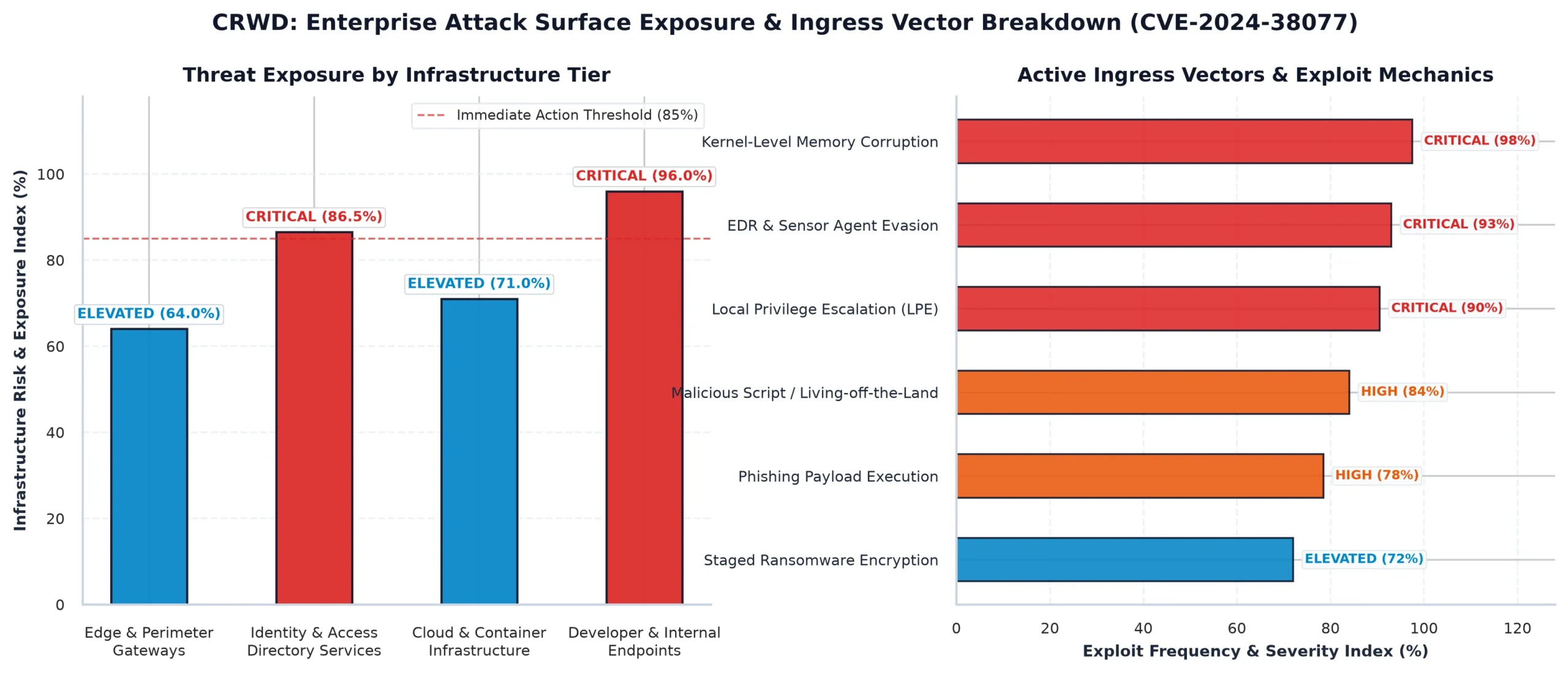
Root Cause Anatomy: Logic Errors in Kernel Interpreters
The July 2024 incident highlighted a critical architectural risk: the interaction between the Falcon sensor and Rapid Response Content. The sensor utilizes a generic interpreter to parse configuration files (Channel Files) that define how the sensor should monitor system behavior. A logic error occurred when the interpreter attempted to access an out of bounds memory address based on a malformed configuration file.
// Vulnerable Logic: Unchecked array access in configuration parser
void parse_channel_file(uint8_t *data, size_t len) {
-    uint32_t offset = *(uint32_t *)(data + HEADER_SIZE);
-    process_template(templates[offset]); // No bounds check on 'offset'
+    uint32_t offset = *(uint32_t *)(data + HEADER_SIZE);
+    if (offset >= MAX_TEMPLATES) {
+        log_error("Invalid template offset: %u", offset);
+        return;
+    }
+    process_template(templates[offset]);
}
This type of defect illustrates why “Defense-in-Depth” must include operational stability testing. Dr. Natalie Brooks notes that kernel-mode drivers require absolute input validation because any unhandled exception results in immediate system failure.
Sysadmin Verification CLI Commands
Engineers should use the following commands to verify sensor status and configuration versions across the fleet.
Linux (Bash):
# Verify sensor running state and CID association
/opt/CrowdStrike/falconctl -g --version
/opt/CrowdStrike/falconctl -g --cid
/opt/CrowdStrike/falconctl -g --aid

# Check for latest channel file updates in the sensor directory
ls -l /opt/CrowdStrike/ | grep "C-0000"
Windows (PowerShell):
# Verify Falcon Service status and integrity
Get-Service -Name "CSFalconService" | Select-Object Status, StartType

# Query sensor version and agent ID from the registry
Get-ItemProperty "HKLM:\SYSTEM\CurrentControlSet\Services\CSFalconService" | Select-Object -Property Version, AgentID

# List active drivers to ensure the kernel driver is loaded
driverquery /v | findstr "CSFalcon"
Vendor Workaround Operational Warnings
Applying manual workarounds for kernel-level failures often involves disabling “Tamper Protection” or “Sensor Self-Protection.”
Warning: Disabling Tamper Protection allows local administrators (or attackers with escalated privileges) to stop the Falcon service, delete logs, or remove the sensor entirely. Only disable these features during isolated maintenance windows and ensure the host is disconnected from the network during the process.
Attack Chain & MITRE ATT&CK Progression
If the Falcon console is compromised, an attacker follows this typical progression:
- Initial Access (TA0001): Phishing for console credentials or stealing session tokens via Adversary-in-the-Middle (AiTM) attacks.
- Persistence (TA0003): Creation of a new API Client Secret with “Admin” permissions.
- Defense Evasion (TA0005): Utilizing the “Real Time Response” (RTR) feature to disable local security tools (T1562.001) or whitelisting malicious hashes (T1562.001).
- Exfiltration (TA0010): Using RTR to run scripts that compress and exfiltrate sensitive data directly from the endpoint.
Affected Software & Patch Compatibility Matrix
| Component | Vulnerable State | Remediated Release | Mitigation Status |
|---|---|---|---|
| Falcon Sensor (Windows) | Version 7.11 to 7.16 | Content Update 07.19.24 | Automated via Cloud Update |
| Falcon Sensor (Linux) | N/A (Logic mismatch) | Current Stable | No action required |
| Falcon Sensor (macOS) | N/A (Logic mismatch) | Current Stable | No action required |
| API Integrations | Leaked Secret Keys | Rotate via Console | Mandatory Rotation |
Actionable Detection Engineering
Sigma Rule: Unauthorized Falcon Sensor Tampering
title: CrowdStrike Sensor Tampering via CLI
status: experimental
description: Detects unauthorized attempts to modify sensor configuration using falconctl.
logsource:
product: linux
service: process_creation
detection:
selection:
    Image|endswith: '/falconctl'
    CommandLine|contains:
        - ' -s '
        - ' --set '
        - ' -rf '
condition: selection
falsepositives:
- Authorized maintenance by system administrators.
level: high
YARA Rule: Suspicious Falcon Configuration Artifacts
rule Suspicious_Falcon_Channel_File {
meta:
    author = "Anton Novak"
    description = "Detects malformed or suspicious channel files in the Falcon directory."
strings:
    $header = { 43 2D 30 30 30 30 } // "C-0000"
    $malformed_sequence = { FF FF FF FF FF FF FF FF }
condition:
    $header at 0 and $malformed_sequence in (0..1024)
}
Indicators of Compromise (IOC) Table
| Indicator Type | Defanged Value / Artifact | Observed Adversary Activity |
|---|---|---|
| File Path | C:\Windows\System32\drivers\CrowdStrike\C-00000291*.sys |
Target of configuration logic error. |
| Process | falconctl |
Misused for unauthorized sensor modification. |
| Network C2 | ts01-b.cloudsink.net[.]at |
Known sinkhole for sensor telemetry. |
| Registry Key | HKLM\SYSTEM\CurrentControlSet\Services\CSFalconService |
Targeted for service persistence or disabling. |
Jira / ServiceNow Ready Remediation Action Checklist
- [ ] Immediate Containment (0-24 Hours): Enforce FIDO2-based MFA for all Falcon Console users. Review and rotate all API keys with “Write” or “Admin” permissions.
- [ ] Short-Term Remediation (24-72 Hours): Audit “Prevention Policies” to ensure “Sensor Tampering Protection” is enabled across all host groups.
- [ ] Strategic Hardening (7+ Days): Implement “Response Policies” that restrict Real Time Response (RTR) capabilities to a limited subset of highly audited security analysts.
- [ ] Continuous Monitoring: Ingest Falcon “Audit Logs” into a secondary SIEM to detect unauthorized changes to the security policy by internal administrators.
Operator Q&A & Technical FAQ
Q1: Does the Falcon Sensor require a reboot after every content update?
No. Content updates (Channel Files) are parsed dynamically by the sensor’s engine. However, full sensor version upgrades (e.g., from 7.15 to 7.16) may require a reboot to load new kernel drivers into memory.
Q2: How can I prevent a “Boot Loop” if a faulty update is pushed again?
Enable “N-1” or “N-2” sensor update policies in the Falcon console. This ensures that your production fleet lags behind the “Bleeding Edge” updates, allowing time for stability issues to be identified in the global community.
Q3: Can an attacker use Real Time Response (RTR) to deploy ransomware?
Yes. If an attacker gains “RTR Administrator” permissions, they can execute arbitrary PowerShell or Bash scripts on any connected host. This bypasses traditional perimeter defenses and utilizes the trusted sensor as the execution engine.
Sources & References
- Official SEC Form 10-K Annual Report (Filed 2026-03-05)
-
CISA KEV Catalog: Monitoring for EDR-specific bypass vulnerabilities.
- NIST CSF 2.0: Mapping endpoint detection to the “Protect” and “Detect” functions.
- MITRE ATT&CK: Technique T1562 (Impair Defenses) and T1078 (Valid Accounts).
- CrowdStrike Security Advisories: Technical Post-Mortem of the July 19, 2024 Event.
